- Tell your words: Speaking practice service for children (project from 09-2023 to 12-2023)
1) Introduction: Motivation and benefits
Team Member
A, Dept of Information System
B, Dept of Korean Language & Literature 19
C, Dept of business administration 18
Research Proposal
Our service is an educational service that uses NUGU AI speakers to help children practice speaking. Nowadays, double-income families are common, and there is a shortage of adults as "talking partners" for children. This was especially true for children who were in the early stages of language acquisition during COVID-19. We aim to solve this problem by utilizing the NUGU AI speaker. Main services of our project are as follows.
Measuring a child's pronunciation skills through simple quizzes
Using the NUGU AI Speaker, we provide some simple quizzes to encourage your child to speak. Then, we provide parents with an analysis report of the children' pronunciation compared to normal pronunciation through deep learning techniques.
This service will help develop the child's language skills in an untact environment. In addition, it tracks the child's language development, giving parents an objective understanding of the child's language skills.
This blog was created for AI&SK NUGU projects.
intro video
https://youtu.be/lCWSIy0JzEo?si=Fp6tHV7KzdUfBj3E
Q) Why are we doing this?
- We all know how the communication skill is important. And also, education for children will affect the next generation. After the pandemic, the alpha(α) generation is facing the problem of lack of language skills. They have learned language through passive digital media such as YouTube instead of direct interaction. For these children, adults have to support to improve their language skill enough, but double-income family is universal especially in Korea, therefore it is difficult to count on individual family member to educate their child.
- Furthermore, this idea may target the lack of speaking education in the English education market in Korea. Many families send children to academies for English education, but nonetheless, academies often focus on grammar and university enrollment exams rather than children's pronunciation and speaking skills.
A) Speaking practice service for children with AI speaker NUGU
- There is a market gap for active 'speaking' education for the alpha generation.
- Due to the characteristics of AI speakers, it can be used for educational purposes even in households where smartphone usage is restricted.
- By utilizing the SKT's other services, for instance 'A.(A dot)', User would get the conveniences.
- Since it is a service based on sound and pronunciation, it is possible to enter the English education market for children not only Korean pronunciation practice because it can efficiently provide services with AI speakers and target both also Korean and English speakers.
Service Target
Alpha generation (born in the 2010s-2020s) and their parents.
2) Select sentences that are difficult to pronounce based on the data
Sentence dataset that are difficult for children
previous research
Learning sounds can be different depending on how we study and what sounds we're looking at. For example, the sound /l/ is learned later. In English, children learn sounds like stops, nasals, glides, liquids, and fricatives in that order, usually around age 6. In Korean, children learn sounds in this order: stops, nasals, liquids, and fricatives, with /s/, /s'/, and /l/ being the last ones. Usually, liquids get replaced by glides, like in English where /r/ becomes [w] and /l/ becomes [w] or [y].
- Frequent pronunciation error examples in English
a. [wæbɩt] 'rabbit' ([R] -> [W])
b. [fit] ‘pit’([P] -> [F])
c. [yif] 'leaf'([l] -> [y]) - Frequent pronunciation error examples in Korean
Examples in Korean (28)
a. [powicha] /policha/ ‘보리차’ ([리] -> [위])
b. [ya:mɔn] /lamyən/ ‘라면’ ([라] -> [야])
c. [thayam] /salam/ ‘사람’ ([사] -> [따])
d. [kita] /kicha/ ‘기차' ([차] -> [타])
The following papers were referenced for the above 'frequent pronunciation errors'
- Templin, M. C. (1957), Certain Language Skills in Children: Their Development and Interrelationships. Institute of Child Welfare Monographs, Vol. 26, Minneapolis: University of Minnesota Press.
- 엄정희(1987), “3, 4, 5세 아동의 말소리 발달에 관한 연구: 자음을 중심으로”, 이화여자 대학교 대학원 석사학위 논문.
- 이기정(1997). "새국어생활", 국립국어원 Vol.1 No.7.
We will be able to obtain sentence data worth learning to child users if we can extract sentences containing the pronunciation presented above among sentences recognized as errors from the transcribed voice data of existing children.
We used 'Korean Children's Voice Data' and 'Child English Voice Data' of AI Hub to obtain practical voice data available.
First, install library and import packages.
!git clone https://github.com/sungalex/aiqa.git
!pip install SpeechRecognition
!pip install pyaudio

import pandas as pd
import speech_recognition as sr
import random
import glob
import json
import warnings
warnings.simplefilter(action='ignore', category=FutureWarning)

from google.colab import drive
drive.mount('/content/drive')
# wav_files_path = 'PATH'
# json_files_path = 'PATH'
AI hub's 'child voice data' is put into the Google stt model to extract only recognized sentences without errors in the system.
We extract only sentences that this Stt model misunderstood at this stage.
recognizer = sr.Recognizer()
recognized_texts = []

# Load wav files
for wav_file in glob.glob(wav_files_path):
try:
with sr.AudioFile(wav_file) as source:
audio_data = recognizer.record(source)
# STT by Google Web Speech API
text = recognizer.recognize_google(audio_data, language="default")
# language = 'ko-KR' when you want to use for korean sentences

recognized_texts.append({'filename': wav_file, 'text': text})
except sr.RequestError as e:
print(f"Google Web Speech API request error: {e}")
except Exception as e:
print(f"Error processing {wav_file}: {e}")

# Create a DataFrame from the list of recognized texts
recognized_texts_df = pd.DataFrame(recognized_texts)
Since 'children's voice data' has been calibrated and labeled by humans, the transcript data made from this data is viewed as 'corrected_text' and compared with the sentences received by the stt model.
Below is the code to load json files and make dataframe with only the sentences with the error corrected in the json format file.
json_texts_df = pd.DataFrame()

# Load json files
for json_file in glob.glob(json_files_path):
with open(json_file, 'r') as file:
data = pd.json_normalize(json.load(file))
json_texts_df = json_texts_df.append(data, ignore_index=True)

json_texts_df.head()
corrected_texts_df = json_texts_df[['File.FileName', 'Transcription.LabelText']]
corrected_texts_df = corrected_texts_df.rename(columns={'File.FileName': 'filename', 'Transcription.LabelText': 'corrected_text'})

merged_df = pd.merge(corrected_texts_df, recognized_texts_df, on=['filename'], how='inner')
It is necessary to preprocess data frames made using Google api and json files so that they can be processed.
recognized_texts_df['filename'] = recognized_texts_df['filename'].str.replace('/content/drive/MyDrive/2023/SKTNUGU/speech_data_of_children_sample/원천데이터/TS_kor_free_01/kor_free/2022-01-22/7938/', '')
recognized_texts_df.head()
Display the DataFrame after removing spaces and punctuation.
merged_df['corrected_text_cleaned'] = merged_df['corrected_text'].str.replace(r'[\s\W_]+', '')
merged_df['text_cleaned'] = merged_df['text'].str.replace(r'[\s\W_]+', '')
When comparing the transcribed sentence with the sentence made by the STT model, only the part where the error is found is selected and made into a new column called 'label'.
def label_text_similarity(row):
return 1 if row['corrected_text_cleaned'] == row['text_cleaned'] else 0

merged_df['label']=merged_df.apply(label_text_similarity, axis=1)

including_difference = merged_df[merged_df['label'] == 0]
And save into csv fomatted file.
including_difference.to_csv('including_difference.csv', index=False)
3) Data Description
- You can download the whole dataset from here.
To evaluate the speaker’s pronunciation fluency, we utilized publicly opened data from the “speech accent archive” (Weinberger, Steven., 2015. Speech Accent Archive. George Mason University. Retrieved from http://accent.gmu.edu). This dataset is dedicated to the study of accents of people from different language backgrounds and provides English speech data recorded by people of different countries, genders, and ages. Native and non-native English speakers read a given English paragraph, and their readings are carefully recorded. Here’s how the researchers collected their data.
They constructed an elicitation paragraph that read by each subject. This paragraph is written in common English words, but contains challenging English sound and sound sequences, encompassing practically all English phonetics. Each subject is recorded individually in a quiet room. Subjects sit at a table and are approximately 8-10 inches from the microphone. Subjects are then allowed to look at the elicitation paragraph for a minute or so, and they are permitted to ask about words that are unfamiliar. Subjects then read the paragraph once into a high-quality recording device. (Many of these recordings were done on a Sony TC-D5M using a Radio Shack 33-3001 unidirectional dynamic microphone, and on a Sony minidisk recorder. MDR-70, with a Sony ECM-MS907 stereo microphone) Every remote researcher must specify the type of recording device employed. Below is the recorded elicitation paragraph.
The elicitation paragraph:
Please call Stella. Ask her to bring these things with her from the store: Six spoons of fresh snow peas, five thick slabs of blue cheese, and maybe a snack for her brother Bob. We also need a small plastic snake and a big toy frog for the children. She can scoop these things into three red bags, and we will go meet her Wednesday at the train station.
The elicitation paragraph contains most of the consonants, vowels, and clusters of standard American English.
This dataset contains 2140 speech samples, each from a different speaker reading the same paragraph (However, during the process of our research, we excluded a few voice files that were too large due to GPU capacity issues). Speakers came from 177 countries and have 214 different native languages. Each speaker is speaking in English.
This dataset contains the following files:
- reading-passage.txt: the text all speakers read (the elicitation paragraph)
- speakers_all.csv: demographic information on every speaker
- recording: a zipped folder containing .mp3 files with speech
Below image shows an overview of an EDA result of demographic information of speakers (speakers_all.csv), generated from pandas profiling. If you are interested in the whole profiling report, please refer to the 'speech_dataset_profile.html' file from our share directory.

4) Labeling via few-shot learning
A dataset we wanted was that contains audio files of multiple people saying the same phrase, labeled with pronunciation scores, but this type of dataset was hard to find. So we decided to manually label the pronunciation scores ourselves. In the real service cases, we assume that the manual labeling is done by experts. However, it is too exhaustive and almost impossible to manually label all the audio data. Hence, we used a few-shot learning technique. The idea of few-shot learning is “learns to discriminate” through the training set, and when a query comes in, it tries to guess which of the support set it is like. In other words, it doesn’t solve the problem of which class the query image ‘belongs to’, but rather which class it is ‘similar to’.
In this stage, we first change our wav files into tensors. And before few-shot learning, we manually labeled the sample data as 0,1,2 (higher means better pronunciation) for accuracy, completeness, fluency, and prosodic. We then used this data and few-shot learning technique to label pronunciation scores for the entire dataset. If you wonder what each evaluation metric means, please refer below.
- accuracy: The level at which the learner pronounces each word with an accurate utterance
- completeness: The percentage of the words that are actually pronounced
- fluency: Does the speaker pronounce smoothly and without unnecessary pauses?
- prosodic: Does the speaker pronounce in correct intonation, stable speaking speed and rhythm?
1. Import packages
First import packages, and mount on Google Drive.
import os
import torch
import math
import warnings
import torch.nn as nn
import numpy as np
import pandas as pd
import torch.optim as optim
import torch.nn.functional as F
import soundfile as sf
from sklearn.model_selection import train_test_split
from transformers import Wav2Vec2Processor, Wav2Vec2Model
from tqdm import tqdm
from itertools import combinations, product

warnings.filterwarnings('ignore')
from google.colab import drive
drive.mount('/content/drive')2. Change wav to tensors and manually label samples
First, make sure your GPU is available. To practice our code, we strongly recommend you use GPU.
# Check if GPU is available
device = torch.device("cuda" if torch.cuda.is_available() else "cpu")
print(f"Using device: {device}")Then load Wav2Vec2 model and processor. Wav2vec2 model will transform our wav files into tensors. Wav2Vec2 processor offers all functionalities of Wav2Vec2 feature extractor and Wav2Vec2 CTC tokenizer. We use this to utilize feature extractor functionality, which process inputs in the form of appropriate inputs to the model.
# Load wav2vec2.0 model and processor
processor = Wav2Vec2Processor.from_pretrained("facebook/wav2vec2-base")
model = Wav2Vec2Model.from_pretrained("facebook/wav2vec2-base").to(device)Then, we define a wav2vec function that uses a Wav2Vec2 model to convert the audio file into a tensor. The function first loads the audio file from the specified path using the sf.read function from the soundfile library, and process the audio input using a pre-defined processor. Note that you have to resample your audio file into 16000 sampling rate for the proper use of the model, since Wav2Vec2 model is pre-trained by 16000Hz audio files. The processed input is returned as a PyTorch tensor and is stored in the variable input_values. Next, it moves the processed input data to specified device (GPU or CPU), and feed the input_values into the model and obtain the output features. The last_hidden_state attribute is accessed to retrieve the final hidden states of the model. Lastly, it computes the mean along the obtained features, and returns fixed_length_vector.
def wav2vec(audio_path):
# load audio file
audio_input, _ = sf.read(audio_path)
# prepare input data
input_values = processor(audio_input, return_tensors="pt", sampling_rate=16000).input_values
# move input data to GPU
input_values = input_values.to(device)
# predict by using wav2vec model
with torch.no_grad():
features = model(input_values).last_hidden_state
# transform to fixed_length vector
fixed_length_vector = torch.mean(features, dim=1)
return fixed_length_vectorIn the next step, we create a new data frame that will contain the file paths of each wav files and tensors. We first store the file paths fore each wav files.
# initialize new dataframe
df = pd.DataFrame(columns = ['file_path', 'output_path','vector', 'accuracy', 'completeness', 'fluency', 'prosodic'])# load reference audio files
original_path = 'your_own_path/recordings/original'
original_paths = [os.path.join(original_path, f) for f in os.listdir(original_path)]
df['file_path'] = original_pathsThen, we create a reference dataset by converting each audio files into same-sized tensors. Note that depending on the shape of your data frame, you will need to change the indexes of the df.iloc and df.iat functions accordingly. Also, if you have a large audio file, it is recommended to use a try except statement since it can cause a ‘CUDA out of memory’ error.
# change the audio data to tensors
for i in tqdm(range(len(df))):
try:
y = wav2vec(df.iloc[i,0])
df.iat[i,2] = y
except Exception as e:
print(i,e)Lastly, we remove the rows that have NaN value (data that failed to transformed into a tensor because of the lack of GPU memory) and save the data frame as an audio_reference.pkl file. At this stage, we listened to each sample speech files and manually labeled the pronunciation scores. Since this is a somewhat cumbersome process, you can simply use the provided audio_reference.pkl file in the share folder.
df = df[df['vector'].notnull()]
df.reset_index(inplace = True, drop=True)# after storing the data frame, we manually labeled sample wav files and updated the audio_reference.pkl file
df.to_pickle('your_own_path/audio_reference.pkl')3. Few-shot learning
Before few-shot learning, we load the audio_reference.pkl file that contains all wav file paths, tensors, and some of the wav files are labeled.
# Note that you have to manually label your sample before this process
# audio_reference.pkl file contains manually labeled sample scores at this moment
df = pd.read_pickle('your_own_path/audio_reference.pkl')Then, we define Audio_Encoder class. We first define Audio_Encoder class based on the transformer encoder. This model first generates the tensor that filled with zero. And then, it copies each of the input data into this tensor so that the sequence lengths of the input data are all the same. Next, we generate a randomized tensor and add it to the front of the input data. After that, we once again generate a padding mask to mask out the empty parts of the sequence, and feed it into the Transformer encoder to get the output. Finally, we take the first vector and use it as a feature vector. This encoder embeds the input audio data to extract high-dimensional features.
class Audio_Encoder(nn.Module):
def __init__(self, num_heads, num_layers):
super().__init__()
self.sentecne_level = nn.TransformerEncoder(nn.TransformerEncoderLayer(d_model=768, nhead=num_heads),num_layers=num_layers)
def forward(self, batch):
max_len = max([e.size(0) for e in batch])
padded_embeddings = torch.zeros(len(batch), max_len, batch[0].size(1)).to(device)
for i, emb in enumerate(batch):
seq_len = emb.size(0)
padded_embeddings[i, :seq_len, :] = emb
random_tensor = torch.randn(padded_embeddings.size(0), 1, padded_embeddings.size(2)).to(device)
batch_tensor = torch.cat((random_tensor, padded_embeddings), dim=1)
batch_tensor = batch_tensor.permute(1 ,0 ,2).float()
padding_mask = batch_tensor.sum(dim=-1).permute(1 ,0) == 0
output_batch = self.sentecne_level(batch_tensor.float(), src_key_padding_mask=padding_mask)
output_batch = output_batch.permute(1 ,0 ,2)
feature_vecs = output_batch[:,0,:]
return feature_vecsNext, we define few_shot_Model class. Here we are defining an encoder, two fully connected layers (self.fc1, self.fc2), a ReLU activation function (self.ac), and a sigmoid function (self.sigmoid). self.encoder takes in the Audio Encoder instance we defined earlier. This model first embeds the input data (voice_pair) through an encoder and passes it through a fully connected layer and ReLU activation function. After that, it passes the data through a second fully connected layer and computes the cosine similarity between the two voice samples. This similarity value becomes the final output of the model.
class few_shot_Model(nn.Module):
def __init__(self, encoder):
super().__init__()
self.encoder = encoder
self.fc1 = nn.Linear(768,768)
self.ac = nn.ReLU()
self.fc2 = nn.Linear(768,256)
self.sigmoid = nn.Sigmoid()
def forward(self, voice_pair):
voice_pair = self.encoder(voice_pair)
voice_pair = self.fc1(voice_pair)
voice_pair = self.ac(voice_pair)
voice_pair = self.fc2(voice_pair)
similarity = torch.cosine_similarity(voice_pair[0], voice_pair[1], dim=0)
out = similarity
return outAnd then, we split the data frame that is manually labeled and not to train and test variable, respectively. Also, we stored the indexes of the data labeled 0, 1, 2 in the variables g1, g2, g3, respectively. (In here we use accuracy case, but we executed the whole process for prosodic, completeness, and fluency as well)
# split train and test data
train = df[df['accuracy'].notnull()]
test = df[df['accuracy'].isnull()]# check index of 0,1 and 2
g1 = train[train['accuracy']==0].index
g2 = train[train['accuracy']==1].index
g3 = train[train['accuracy']==2].indexAnd we set binary cross entropy as a loss function and Adam as an optimizer.
# instantiate encoder model and set hyper parameters
encoder = Audio_Encoder(1,1)
f_model = few_shot_Model(encoder).to(device)
criterion = nn.BCELoss().to(device)
optimizer = torch.optim.Adam(f_model.parameters(), lr=0.00001)The code below implements the entire training process. In the first part (data with same classes), we use the combinations functions to generate data pairs within each class. Since these data pairs belong to the same class, the target is set to 1. For each data pair, the model calculates the output, compares it to the target, and calculate the loss. After adding up these losses, the gradient is calculated via backward(), and the parameters are updated by calling the step(), method of the optimizer. This process is performed independently for g1, g2, and g3. In the second part (data with different classes), we use the product function to create a data pair between different classes. Since these data pairs belong to different classes, the target value is set to 0. The rest of the process is same as the first part. However, this process is performed independently for g1 / g2, g2 / g3 and g3 / g1.
# data with same classes
for epoch in range(10) :
epoch_loss = 0
target = torch.tensor([1.0]).to(device)
total_loss = 0
optimizer.zero_grad()
for i,j in combinations(g1,2) :
f_model.train()
data = df.iloc[[i,j],2]
data = tuple(d.to(device) for d in data)
output = f_model(data).unsqueeze(0)
loss = criterion(output, target)
total_loss += loss
total_loss.backward()
optimizer.step()
epoch_loss += total_loss
total_loss = 0
optimizer.zero_grad()
for i,j in combinations(g2,2) :
f_model.train()
data = df.iloc[[i,j],2]
data = tuple(d.to(device) for d in data)
output = f_model(data).unsqueeze(0)
loss = criterion(output, target)
total_loss += loss
total_loss.backward()
optimizer.step()
epoch_loss += total_loss
total_loss = 0
optimizer.zero_grad()
for i,j in combinations(g3,2) :
f_model.train()
data = df.iloc[[i,j],2]
data = tuple(d.to(device) for d in data)
output = f_model(data).unsqueeze(0)
loss = criterion(output, target)
total_loss += loss
total_loss.backward()
optimizer.step()
epoch_loss += total_loss
# data with different classes
target = torch.tensor([0.0]).to(device)
total_loss = 0
optimizer.zero_grad()
for i,j in product(g1, g2) :
f_model.train()
data = df.iloc[[i,j],2]
data = tuple(d.to(device) for d in data)
output = f_model(data).unsqueeze(0)
loss = criterion(output, target)
total_loss += loss
total_loss.backward()
optimizer.step()
epoch_loss += total_loss
total_loss = 0
optimizer.zero_grad()
for i,j in product(g1, g3) :
f_model.train()
data = df.iloc[[i,j],2]
data = tuple(d.to(device) for d in data)
output = f_model(data).unsqueeze(0)
loss = criterion(output, target)
total_loss += loss
total_loss.backward()
optimizer.step()
epoch_loss += total_loss
total_loss = 0
optimizer.zero_grad()
for i,j in product(g2, g3) :
f_model.train()
data = df.iloc[[i,j],2]
data = tuple(d.to(device) for d in data)
output = f_model(data).unsqueeze(0)
loss = criterion(output, target)
total_loss += loss
total_loss.backward()
optimizer.step()
epoch_loss += total_loss
print('epoch',epoch+1,epoch_loss.item())4. Labeling via few-shot learned model
And then we store index of test (data that is not labeled yet) to tests variable.
tests = test.indexFinally, we change the model’s training mode to evaluation mode, and for each test data, we compute the similarity to each class and determine the final class. Variables s1, s2 and s3 store scores indicating how similar the test data is to classes g1, g2 and g3, respectively. For instance, the similarity between each data in g1 and test data is summed up and stored in s1. We apply a sigmoid function to the model’s output to convert the result to a value between 0 and 1.
for idx in tqdm(tests):
f_model.eval()
s1 = 0
for i1 in g1 :
data = df.iloc[[idx, i1], 2]
data = tuple(d.to(device) for d in data)
s1 += torch.sigmoid(f_model(data)).detach().item()
s2 = 0
for i1 in g2 :
data = df.iloc[[idx, i1], 2]
data = tuple(d.to(device) for d in data)
s2 += torch.sigmoid(f_model(data)).detach().item()
s3 = 0
for i1 in g3 :
data = df.iloc[[idx, i1], 2]
data = tuple(d.to(device) for d in data)
s3 += torch.sigmoid(f_model(data)).detach().item()
ans = max([s1, s2, s3])
if ans == s1 :
df.iat[idx,-4] = 0
elif ans == s2 :
df.iat[idx,-4] = 1
else :
df.iat[idx,-4] = 2print(df['accuracy'].value_counts())And we store the data frame for the later use.
df.to_pickle('your_own_path/audio_reference_scored.pkl')5) Audio-augmentation
After labeling the pronunciation scores of the speech data, we performed data augmentation. There are many benefits of it, but here are some of the most important ones.
- Improvement in Generalization Ability: Augmentation helps the model to not overly rely on specific environments or conditions. This enables the model to maintain high performance in various real-world situations.
- Prevention of Overfitting: Augmentation aids in preventing overfitting when the training data is limited. Exposure to diverse forms and types of data enhances the generalization ability, preventing the model from fitting to closely too the training set.
- Creation of Robust Models: Augmentation helps in making model more robust and resilient. For example, it enhances the model’s ability to handle noise, environmental variations, and imperfect speech, contributing to its robustness in real-world scenarios.
The most important part of data augmentation is it can ensure the reliability of the model. Speech recorded by A.I. speaker is susceptible to ambient noise. However, by adding noise and other sound effects during the augmentation process, we can create a model that is robust to these situations. To augment wav files, we referred “Data Augmenting Contrastive Learning of Speech Representations in the Time Domain” (Kharitonov et al., 2020) from paperswithcode, and used WavAugment library.
Papers with Code - Data Augmenting Contrastive Learning of Speech Representations in the Time Domain
1. Download and import packages
First, install sox (Sound exChange), torchaudio, and WavAugment, and import libraries.
! apt-get install libsox-fmt-all libsox-dev sox > /dev/null
! python -m pip install torchaudio > /dev/null
! python -m pip install git+https://github.com/facebookresearch/WavAugment.git > /dev/nullfrom tqdm import tqdm
import pandas as pd
import numpy as np
import torchaudio
import torch
import augment
import random
import osfrom google.colab import drive
drive.mount('/content/drive')2. Audio augmentation
First, make sure your GPU is available.
# Check if GPU is available
device = torch.device("cuda" if torch.cuda.is_available() else "cpu")
print(f"Using device: {device}")And then we load audio_reference_scored.pkl file that was created in the before stage. This pickle file is containing file paths of each wav files, tensors and whole pronunciation scores. If you want to skip the before stage, you can simply use audio_reference_scored.pkl file in the share folder.
# initialize new dataframe
df = pd.read_pickle('your_own_path/audio_reference_scored.pkl')Next, we check the input file paths (paths of original wav files) and output file paths (paths of augmented wav files) using os library and store them to the data frame.
# load reference audio files
output_path = 'your_own_path/recordings/augmented'
original_path = 'your_own_path/recordings/original'
output_paths = [os.path.join(output_path, file) for file in os.listdir(original_path)]
df['output_path'] = output_pathsAfter that, we define an audio_modification function, that will modify the original wav files. This function will randomly apply one of four wav augmentation techniques to the source file.
- Pitch shift: Make lower or higher the pitch of the voice. For example, -200 indicates that we’ll go lower by 200 cents of the tone.
- Reverberation: Add echo to a sound signal, conveying spatial depth and width to the sound. Each parameter in reverb() function stands for reverberance, dumping factor, and room size.
- Noise : Applying additive noise. In this case, we used generated uniform noise.
- Time dropout: Substituting a brief segment of audio with periods of silence. This method is frequently employed in the literature.
# function to modify original audio file
# change the pitch, add reverb effect, additive noise, and drop out random section of audio
def audio_modification(wave_path, random_pitch_shift, random_room_size):
x, sr = torchaudio.load(wave_path)
r = random.randint(1,5)
if r == 1:
random_pitch_shift_effect = augment.EffectChain().pitch("-q", random_pitch_shift).rate(sr)
y = random_pitch_shift_effect.apply(x, src_info={'rate': sr})
elif r == 2:
random_reverb = augment.EffectChain().reverb(50, 50, random_room_size).channels(1)
y = random_reverb.apply(x, src_info={'rate': sr})
elif r == 3:
noise_generator = lambda: torch.zeros_like(x).uniform_()
y = augment.EffectChain().additive_noise(noise_generator, snr=15).apply(x, src_info={'rate': sr})
else:
y = augment.EffectChain().time_dropout(max_seconds=0.5).apply(x, src_info={'rate': sr})
return yThen, we initialize the random_pitch_shift and random_room_size variables. For random_room_size, we set it from 0 to 51, and for random_pitch_shift, we set it from -100 to 100 so that it doesn’t pitch too high or low since we’re targeting children. After that, we call the function and store the tensor form of modified wav file data at the modified_vector column of the data frame that we already created.
# set randomized parameters
random_pitch_shift = lambda: np.random.randint(-100, +100)
random_room_size = lambda: np.random.randint(0, 51)tqdm.pandas()
df['modified_vector'] = df['file_path'].progress_apply(lambda x: audio_modification(x, random_pitch_shift, random_room_size))Finally, to check the augmented result files, we converted the modified_vectors into wav files and saved them into the output_path of each augmented result.
# Generate augmented wav files
for i in tqdm(range(len(df))):
output_path = df.loc[i, 'output_path']
y = df.loc[i, 'modified_vector']
torchaudio.save(output_path, y, sample_rate = 44100)3. Create a new reference pickle file for later use
We create a new reference file audio_reference_scored_augmented.pkl that contains all original and augmented wav files, and their pronunciation scores for later use. At this step, we set the pronunciation score of the augmented wav file to be the same as the score of the original wav file.
# Create new dataframe that contains original and augmented wav file paths and their features
file_path = df['file_path'].to_list() + df['output_path'].to_list()
accuracy = df['accuracy'].to_list() * 2
completeness = df['completeness'].to_list() * 2
fluency = df['fluency'].to_list() * 2
prosodic = df['prosodic'].to_list() * 2
result = pd.DataFrame(columns = ['file_path', 'vector', 'accuracy', 'completeness', 'fluency', 'prosodic'])
result['file_path'] = file_path
result['accuracy'] = accuracy
result['completeness'] = completeness
result['fluency'] = fluency
result['prosodic'] = prosodic# save the data frame
result.to_pickle('your_own_path/audio_reference_scored_augmented.pkl')6) Pronunciation scoring via similarity
Finally, this is a stage for scoring the children’s pronunciation, and visualize it as a graph. We take two different approaches to predict the children’s pronunciation, one based on the similarity comparison and the other based on the fine-tuned model prediction. This is the first approach, predicting the child’s pronunciation score based on the similarity to the reference data. A big assumption in this stage is that audio files with similar pronunciation will also be similar when they are vectorized. So if we have reference data consisting of audio files of different children pronouncing the same phrase and their pronunciation scores, we can determine the score of new input data based on the reference. The overall process is as follows.
- Convert the reference audio file to a tensor using Wav2Vec 2.0: After augmentation, we built our reference dataset by converting all the audio files into tensors using Wav2Vec 2.0 model.
- Convert test data into tensor and find the most similar tensors: When a recorded child’s voice comes through the AI speaker, we convert it to a tensor and find the reference that is most similar to it. In this case, we used cosine similarity to calculate the similarity.
- Visualize a child’s predicted pronunciation score: Visualize the child’s predicted pronunciation scores for the four categories in a radar chart. To visualize the graph, we used the plotly library.
For the use of wav2vec 2.0 model, we referred to “wav2vec 2.0: A Framework for Self-Supervised Learning of Speech Representations” (Baevski et al., 2020) from paperswithcode.
Papers with Code - wav2vec 2.0: A Framework for Self-Supervised Learning of Speech Representations
1. Download and import packages
First, install pydub library and import packages.
!pip install pydubfrom transformers import Wav2Vec2Processor, Wav2Vec2Model
from torch.nn.functional import cosine_similarity
from tqdm import tqdm
from pydub import AudioSegment
import plotly.graph_objects as go
import soundfile as sf
import pandas as pd
import numpy as np
import torch
import warnings
import osfrom google.colab import drive
drive.mount('/content/drive')2. Change wav files to tensors via pre-trained Wav2Vec 2.0 model
Next, check the availability of GPU and load Wav2Vec2 model and processor.
# Check if GPU is available
device = torch.device("cuda" if torch.cuda.is_available() else "cpu")
print(f"Using device: {device}")# Load wav2vec2.0 model and processor
processor = Wav2Vec2Processor.from_pretrained("facebook/wav2vec2-base")
model = Wav2Vec2Model.from_pretrained("facebook/wav2vec2-base").to(device)Then, we define a wav2vec function that uses a Wav2Vec2 model to convert the audio file into a tensor. The function first loads the audio file from the specified path using the sf.read function from the soundfile library, and process the audio input using a pre-defined processor. Note that you have to resample your audio file into 16000 sampling rates for the proper use of the model, since Wav2Vec2 model is pre-trained by 16000Hz audio files. The processed input is returned as a PyTorch tensor and is stored in the variable input_values. Next, it moves the processed input data to specified device (GPU or CPU) and feed the input_values into the model and obtain the output features. The last_hidden_state attribute is accessed to retrieve the final hidden states of the model. Lastly, it computes the mean along the obtained features, and returns fixed_length_vector. (This is same function with wav2vec function in “Labeling via few-shot learning” stage)
def wav2vec(audio_path):
# load audio file
audio_input, _ = sf.read(audio_path)
# prepare input data
input_values = processor(audio_input, return_tensors="pt", sampling_rate=16000).input_values
# move input data to GPU
input_values = input_values.to(device)
# predict by using wav2vec model
with torch.no_grad():
features = model(input_values).last_hidden_state
# transform to fixed_length vector
fixed_length_vector = torch.mean(features, dim=1)
return fixed_length_vectorIn the next step, we load audio_reference_scored_augmented.pkl file. Then, we create a final reference dataset by converting each audio files into same-sized tensors. Note that depending on the shape of your data frame, you will need to change the indexes of the df.iloc and df.iat functions accordingly. Also, if you have a large audio file, it is recommended to use a try except statement since it can cause a ‘CUDA out of memory’ error.
# load audio_reference_scored_augmented.pkl file
df = pd.read_pickle('your_own_path/audio_reference_scored_augmented.pkl')for i in tqdm(range(len(df))):
try:
y = wav2vec(df.iloc[i,0])
df.iat[i,1] = y
except Exception as e:
print(i,e)And then we save the final reference file as audio_reference_final.pkl for later use.
# save the data frame in pickle file
df.to_pickle('your_own_path/audio_reference_final.pkl')3. Convert new speech data into a tensor and find the n most similar tensors
Now, this is the step to find n most similar tensors and predict the child’s pronunciation score. First, load audio_reference_final.pkl file.
df = pd.read_pickle('your_own_path/audio_reference_final.pkl')To get a test input, we define a simple function that convert m4a file format into wav file format (since our recorded data was m4a format), and convert the test file into wav format.
def convert_m4a_to_wav(input_path, output_path):
# load m4a file
audio = AudioSegment.from_file(input_path, format="m4a")
# save as wav file
audio.export(output_path, format="wav")m4a_file_path = "your_own_path/test.m4a"
wav_file_path = "your_own_path/test.wav"
convert_m4a_to_wav(m4a_file_path, wav_file_path)After the file format conversion, we load the test file once again, transform it into a tensor, and calculate the cosine similarity with each reference data. Then, we predict the pronunciation score of the test file as the mean value of the pronunciation score of 50 most similar references to the test file.
# load test audio file
test_path = 'your_own_path/test.wav'
test_vector = wav2vec(test_path)
# how many references to calculate the score?
n = 50
# calculate the pronunciation score of test voice by calcualting cosine similarity
df['sim'] = df['vector'].apply(lambda x: cosine_similarity(x, test_vector))
score_df = df.sort_values('sim').iloc[:n][['accuracy','completeness','fluency','prosodic']]accuracy = score_df['accuracy'].mean()
completeness = score_df['completeness'].mean()
fluency = score_df['fluency'].mean()
prosodic = score_df['prosodic'].mean()4. Graph a child’s pronunciation score
Finally, using plotly library, we visualize a child’s pronunciation score in a radar chart. Note that the first graph that named as ‘Average Score’ is an arbitrary graph that represents the average pronunciation score of all children.
# graph visualization via plotly
fig = go.Figure()
categories = ['Accuracy', 'Completeness', 'Fluency', 'Prosodic']
fig.add_trace(go.Scatterpolar(
r=[1.2,1.3,0.5,1.5],
theta=categories,
fill='toself',
name="Average Score"
))
fig.add_trace(go.Scatterpolar(
r=[accuracy, completeness, fluency, prosodic],
theta=categories,
fill='toself',
name="Child Pronunciation Score"
))
fig.update_layout(
polar=dict(
radialaxis=dict(
visible=True,
showticklabels=False,
range=[0, 2]
)),
showlegend=True
)
fig.show()7) Pronunciation scoring via fine-tuned model
Finally, this is a stage for scoring the children’s pronunciation. We take two different approaches to predict the children’s pronunciation, one based on the similarity comparison and the other based on the fine-tuned model prediction. This is the second approach, predicting the child’s pronunciation score based on the fine-tuned model prediction. In this stage, we will use the labeled data from the few-shot learning to fine-tune the Wav2Vec2 model. To make the details of our model available to everyone, we trained the model using Hugging Face’s libraries and uploaded the trained model to our Hugging Face’s model space. (For those who are curious, please refer to the link below) Since we have total four target variables (accuracy, completeness, fluency and prosodic), we executed four different versions of model training, and uploaded each fine-tuned model. The overall process is as follows.
- Preprocessing the dataset: We first load the final audio files and preprocess it in the format that suitable for model training. At this stage, we split the whole dataset into train, validation and test dataset.
- Fine-tuning: Using the preprocessed dataset, we fine-tuned the model in four different versions. Each version’s target variables are accuracy, completeness, fluency and prosodic. Then we uploaded these fine-tuned models on Hugging Face space.
- Prediction: Using the fine-tuned models, we predict the pronunciation scores of the test wav file, and visualize it as a radar chart using 'plotly' library.
For this stage, we referred to the official guidance of Hugging Face.
To check each fine-tuned model, please refer below.
JunBro/pronunciation_scoring_model_accuracy · Hugging Face
JunBro/pronunciation_scoring_model_completeness · Hugging Face
JunBro/pronunciation_scoring_model_fluency · Hugging Face
JunBro/pronunciation_scoring_model_prosodic · Hugging Face
1. Download and import packages
First, download and import packages. Note that YOU MUST RESTART YOUR RUNTIME after downloading the packages to ensure the proper execution of the code.
! pip install -U accelerate
! pip install -U transformers
! pip install datasets evaluateimport torch
import evaluate
import librosa
import numpy as np
import pandas as pd
import warnings
import plotly.graph_objects as go
from datasets import Dataset
from tqdm import tqdm
from transformers import AutoModelForAudioClassification, AutoFeatureExtractor, TrainingArguments, Trainer
from sklearn.model_selection import train_test_split
warnings.filterwarnings('ignore')
from google.colab import drive
drive.mount('/content/drive')If you want to share your fine-tuned model with the Hugging Face community, you should log in to your Hugging Face account. To login, you should enter your own token to login. If you don’t want to, you can simply skip this step.
# login to your huggingface account for model upload (you can skip this step)
from huggingface_hub import notebook_login
notebook_login()2. Load and preprocess dataset
To preprocess the dataset into the right format, we first load our 'audio_reference_final.pkl' file.
# load the dataset
df = pd.read_pickle('your_own_path/audio_reference_final.pkl')Then split the dataset into train, validation, and test dataset. We set the ratio of train to test to 8:2. And we used 20% of the train dataset as a validation dataset. For the final evaluation of the model performance, we save the test dataset as 'test.pkl' file.
# split the dataset into train, valid, and test dataset
train, test = train_test_split(df, test_size = 0.2)
train, val = train_test_split(train, test_size = 0.2)
test.to_pickle('your_own_path/test.pkl')Next, we create a dictionary that maps the label name (bad, normal, good) to an integer (0,1, 2) and vice versa. ('label2id', 'id2label') This helps the model to associate label names with their corresponding ids.
# 0 stands for 'bad', 1 stands for 'normal', 2 stands for 'good'
labels = ['bad', 'normal', 'good']
label2id, id2label = dict(), dict()
for i, label in enumerate(labels):
label2id[label] = str(i)
id2label[str(i)] = labelid2label[str(1)]After that, load Wav2Vec2 feature extractor, and define a function that preprocess the data in proper format ('preprocess_function'). This function first load audio file from the specified path and process the audio input using a 'feature_extractor'. Note that you have to resample your audio file into 16000 sampling rate for the proper use of the model, since Wav2Vec2 model is pre-trained by 16000Hz audio files. The processed input is returned as a variable 'inputs'.
# load wav2vec 2.0 feature extractor model
feature_extractor = AutoFeatureExtractor.from_pretrained("facebook/wav2vec2-base")
# Define preprocess function, note that you have to resample your wav file into 16000 sampling rate, to properly fine tune the wav2vec 2.0 model
def preprocess_function(examples):
audio_arrays = [librosa.load(x)[0] for x in examples["file_path"]]
inputs = feature_extractor(
audio_arrays, sampling_rate=feature_extractor.sampling_rate, max_length=16000, truncation=True
)
return inputsUsing the 'preprocess_function', preprocess train dataset and validation dataset respectively. Recall that 'train' and 'val' are variables that contain data frame for train dataset and validation dataset. We create 'train_labels' and 'val_labels' lists and store pronunciation score values. And the datasets are created for training and validation. For each label in 'train_labels' and 'val_labels', a dataset is constructed using the 'Dataset.from_dict()' method. The dataset includes the keys: ‘label’, which contains the list representation of the corresponding label, and ‘input_values', which contains the preprocessed inputs. Lastly, the datasets are unpacked into separate variables for each label for both training and validation. This allows for easy access to individual datasets during the training process.
# Preprocess inputs, this might take quite long time
train_inputs = preprocess_function(train)['input_values']
val_inputs = preprocess_function(val)['input_values']
# Define label lists for training and validation
train_labels = [train['accuracy'], train['completeness'], train['fluency'], train['prosodic']]
val_labels = [val['accuracy'], val['completeness'], val['fluency'], val['prosodic']]
# Create datasets for training
train_datasets = []
for label in train_labels:
dataset = Dataset.from_dict({'label': label.to_list(), 'input_values': train_inputs})
train_datasets.append(dataset)
# Create datasets for validation
val_datasets = []
for label in val_labels:
dataset = Dataset.from_dict({'label': label.to_list(), 'input_values': val_inputs})
val_datasets.append(dataset)
# Unpack datasets for training
ds_train1, ds_train2, ds_train3, ds_train4 = train_datasets
# Unpack datasets for validation
ds_val1, ds_val2, ds_val3, ds_val4 = val_datasets3. Fine-tuning
To include a metric during the training process, we load an evaluation method (accuracy this time) and define a function that compute the accuracy ('compute_metrics').
# load the 'accuracy' metric with the Evaluate library
accuracy = evaluate.load("accuracy")
# Define evaluation function
def compute_metrics(eval_pred):
predictions = np.argmax(eval_pred.predictions, axis=1)
return accuracy.compute(predictions=predictions, references=eval_pred.label_ids)And then, we load pre-trained Wav2Vec2 model along with the number of expected labels. (3 in this case)
# Load pre-trained wav2vec2.0 model
num_labels = len(id2label)
model = AutoModelForAudioClassification.from_pretrained(
"facebook/wav2vec2-base", num_labels=num_labels, label2id=label2id, id2label=id2label
)Finally, we can execute our fine-tuning process. We first define hyperparameters in 'TrainingArguments'. Notable configurations include the output directory for saving the model, learning rate, batch sizes for training and evaluation, numbering of training epochs, etc. Then, we pass training arguments to 'Trainer'. A 'Trainer' instance is created, taking in the defined model ('model'), the training arguments('training_args'), training dataset('ds_train1'), validation dataset('ds_val1'), etc. Finally, we call the 'train()' method on the 'trainer1', whose target variable is accuracy (this means pronunciation accuracy) score.
# Define your hyperparameters in TrainingArguments
training_args = TrainingArguments(
output_dir="pronunciation_scoring_model_accuracy",
evaluation_strategy="epoch",
save_strategy="epoch",
learning_rate=3e-5,
per_device_train_batch_size=32,
gradient_accumulation_steps=4,
per_device_eval_batch_size=32,
num_train_epochs=10,
warmup_ratio=0.1,
logging_steps=10,
load_best_model_at_end=True,
metric_for_best_model="accuracy",
push_to_hub=True,
)
# Pass the training arguments to Trainer
trainer1 = Trainer(
model=model,
args=training_args,
train_dataset=ds_train1,
eval_dataset=ds_val1,
tokenizer=feature_extractor,
compute_metrics=compute_metrics,
)
# Train your model
trainer1.train()When your model completes the training process, you can share your model. If you don’t want to, you can simply skip this step. If you execute the code, you will have a new model space looks like the image below.
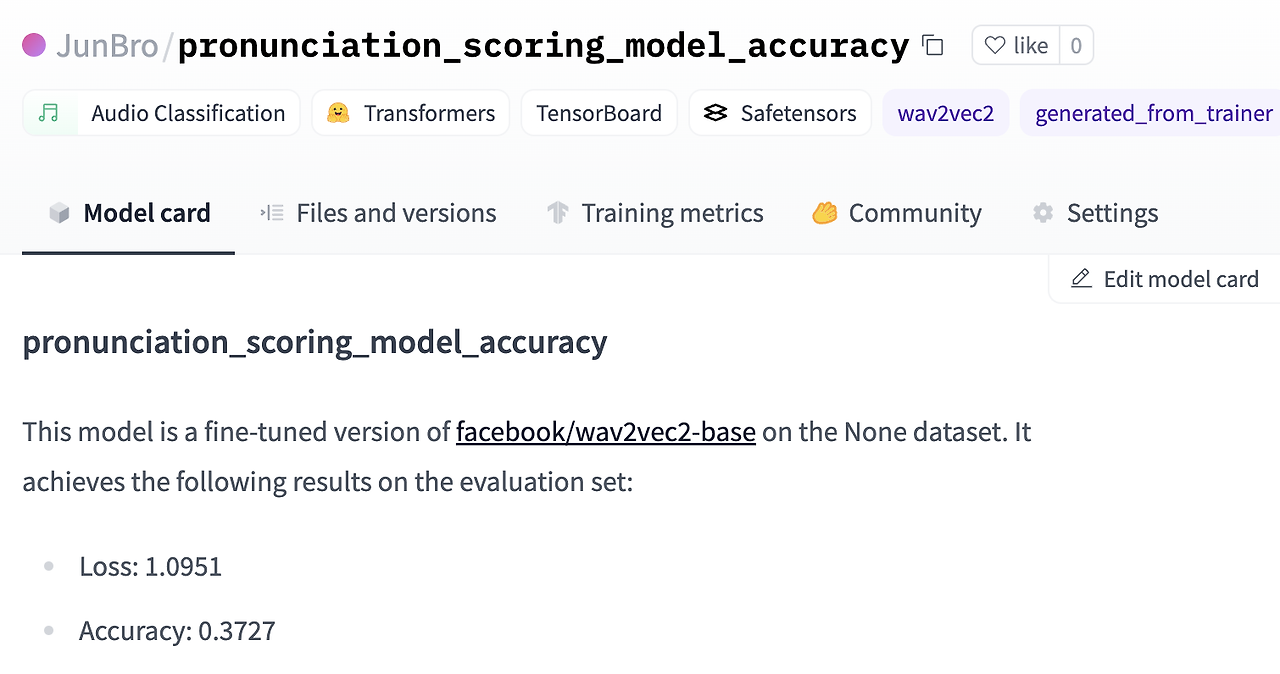
# Push your model to hugging face
trainer1.push_to_hub()And we repeat the whole fine-tuning process for remaining target variables.
# Define your hyperparameters in TrainingArguments
training_args = TrainingArguments(
output_dir="pronunciation_scoring_model_completeness",
evaluation_strategy="epoch",
save_strategy="epoch",
learning_rate=3e-5,
per_device_train_batch_size=32,
gradient_accumulation_steps=4,
per_device_eval_batch_size=32,
num_train_epochs=10,
warmup_ratio=0.1,
logging_steps=10,
load_best_model_at_end=True,
metric_for_best_model="accuracy",
push_to_hub=True,
)
# Pass the training arguments to Trainer
trainer2 = Trainer(
model=model,
args=training_args,
train_dataset=ds_train2,
eval_dataset=ds_val2,
tokenizer=feature_extractor,
compute_metrics=compute_metrics,
)
# Train your model
trainer2.train()
# Push your model to hugging face
trainer2.push_to_hub()# Define your hyperparameters in TrainingArguments
training_args = TrainingArguments(
output_dir="pronunciation_scoring_model_fluency",
evaluation_strategy="epoch",
save_strategy="epoch",
learning_rate=3e-5,
per_device_train_batch_size=32,
gradient_accumulation_steps=4,
per_device_eval_batch_size=32,
num_train_epochs=10,
warmup_ratio=0.1,
logging_steps=10,
load_best_model_at_end=True,
metric_for_best_model="accuracy",
push_to_hub=True,
)
# Pass the training arguments to Trainer
trainer3 = Trainer(
model=model,
args=training_args,
train_dataset=ds_train3,
eval_dataset=ds_val3,
tokenizer=feature_extractor,
compute_metrics=compute_metrics,
)
# Train your model
trainer3.train()
# Push your model to hugging face
trainer3.push_to_hub()# Define your hyperparameters in TrainingArguments
training_args = TrainingArguments(
output_dir="pronunciation_scoring_model_prosodic",
evaluation_strategy="epoch",
save_strategy="epoch",
learning_rate=3e-5,
per_device_train_batch_size=32,
gradient_accumulation_steps=4,
per_device_eval_batch_size=32,
num_train_epochs=10,
warmup_ratio=0.1,
logging_steps=10,
load_best_model_at_end=True,
metric_for_best_model="accuracy",
push_to_hub=True,
)
# Pass the training arguments to Trainer
trainer4 = Trainer(
model=model,
args=training_args,
train_dataset=ds_train4,
eval_dataset=ds_val4,
tokenizer=feature_extractor,
compute_metrics=compute_metrics,
)
# Train your model
trainer4.train()
# Push your model to hugging face
trainer4.push_to_hub()4. Inference
Now we’ve fine-tuned our model, we can use the model to the inference. At this step, we will predict four pronunciation scores of the 'test.wav' file. First, we load 'test.wav' file and preprocess it.
# load test wav file and preprocess it
x, _ = librosa.load('your_own_path/test.wav')
feature_extractor = AutoFeatureExtractor.from_pretrained("JunBro/pronunciation_scoring_model_accuracy")
inputs = feature_extractor(x, sampling_rate=16000, return_tensors="pt")Then, we load four fine-tuned model and pass our test input to each model and return the logits.
# load models
model1 = AutoModelForAudioClassification.from_pretrained("JunBro/pronunciation_scoring_model_accuracy")
model2 = AutoModelForAudioClassification.from_pretrained("JunBro/pronunciation_scoring_model_completeness")
model3 = AutoModelForAudioClassification.from_pretrained("JunBro/pronunciation_scoring_model_fluency")
model4 = AutoModelForAudioClassification.from_pretrained("JunBro/pronunciation_scoring_model_prosodic")
# pass your inputs to the model and return the logits
with torch.no_grad():
logits1 = model1(**inputs).logits
logits2 = model2(**inputs).logits
logits3 = model3(**inputs).logits
logits4 = model4(**inputs).logitsFor the last step, we get the class with the highest probability. We use 'torch.argmax()' function to find the index with the highest probability in each set of logits and converts it to a scalar using '.item()'. These indices represent the predicted class for each label. Then we use the model’s id2label mapping to convert them to a label. Finally, the code prints out the predicted labels for each aspect (accuracy, completeness, fluency, prosodic) based on the highest probability class indices.
# get the class with the highest probability
predicted_class_ids1 = torch.argmax(logits1).item()
predicted_class_ids2 = torch.argmax(logits2).item()
predicted_class_ids3 = torch.argmax(logits3).item()
predicted_class_ids4 = torch.argmax(logits4).item()
# use the model’s id2label mapping to convert it to a label
predicted_label1 = model1.config.id2label[predicted_class_ids1]
predicted_label2 = model2.config.id2label[predicted_class_ids2]
predicted_label3 = model3.config.id2label[predicted_class_ids3]
predicted_label4 = model4.config.id2label[predicted_class_ids4]
# print out the result
print('accuracy:', predicted_label1)
print('completeness:', predicted_label2)
print('fluency:', predicted_label3)
print('prosodic:', predicted_label4)5. Graph visualization
Finally, using 'plotly' library, we visualize a child’s pronunciation score in a radar chart. Note that the first graph that named as ‘Average Score’ is an arbitrary graph that represents the average pronunciation score of all children.
# graph visualization
fig = go.Figure()
categories = ['Accuracy', 'Completeness', 'Fluency', 'Prosodic']
fig.add_trace(go.Scatterpolar(
r=[1.2,1.3,0.5,1.5],
theta=categories,
fill='toself',
name="Average Score"
))
fig.add_trace(go.Scatterpolar(
r=[predicted_class_ids1, predicted_class_ids2, predicted_class_ids3, predicted_class_ids4],
theta=categories,
fill='toself',
name="Child Pronunciation Score"
))
fig.update_layout(
polar=dict(
radialaxis=dict(
visible=True,
showticklabels=False,
range=[0, 2]
)),
showlegend=True
)
fig.show()8) Evaluation
This is the very last stage of our pronunciation prediction. We will evaluate the models’ classification performance at this stage. Since we can’t say that our answer dataset is accurate, it’s wise to follow each process and make it as an opportunity to learn about the overall evaluation process. The evaluation process can be divided into two main steps.
- Predict on test dataset: We first load our fine-tuned models and make a prediction on our test dataset. Recall that we saved our test dataset in 'test.pkl' file.
- Evaluation and graph visualization: Compare the prediction with the original labels, we evaluate the model performance. And we visualize their prediction results as heatmap. To check various evaluation metrics results, we will use 'classification_report' from scikit learn.
1. Import packages
First, import packages.
import pandas as pd
import librosa
import torch
import seaborn as sns
import matplotlib.pyplot as plt
from sklearn.metrics import confusion_matrix, classification_report
from transformers import AutoModelForAudioClassification, AutoFeatureExtractor
from tqdm import tqdm
from google.colab import drive
drive.mount('/content/drive/')2. Predict on test dataset
To predict on the test dataset, first make sure your GPU is available.
# Check if GPU is available
device = torch.device("cuda" if torch.cuda.is_available() else "cpu")
print(f"Using device: {device}")Then, we load our test dataset, 'test.pkl' and store it into 'answer_df' variable. We take only 100 test samples to reduce execution time. (Since we need to run a total of four models, the overall execution time is very long) If you want to test on whole dataset, you can simply skip the last code from below.
# load test dataset
answer_df = pd.read_pickle('your_own_path/test.pkl')
# take only 100 test samples to reduce execution time
# if you want to test on whole dataset, just skip this code
answer_df = answer_df[:100]
And we preprocess our test data as we already did in previous stages. Since all our four models use the same feature extractor, we used the model’s feature extractor as a representative.
# Since all four models used the same feature extractor, we used the accuracy model's feature extractor as a representative
feature_extractor = AutoFeatureExtractor.from_pretrained("JunBro/pronunciation_scoring_model_accuracy")
tqdm.pandas()
answer_df['sample'] = answer_df['file_path'].progress_apply(lambda x : librosa.load(x)[0])
answer_df['input'] = answer_df['sample'].progress_apply(lambda x : feature_extractor(x, sampling_rate=16000, return_tensors="pt"))
Load each model.
# load each model for each pronunciation metrics
model1 = AutoModelForAudioClassification.from_pretrained("JunBro/pronunciation_scoring_model_accuracy")
model2 = AutoModelForAudioClassification.from_pretrained("JunBro/pronunciation_scoring_model_completeness")
model3 = AutoModelForAudioClassification.from_pretrained("JunBro/pronunciation_scoring_model_fluency")
model4 = AutoModelForAudioClassification.from_pretrained("JunBro/pronunciation_scoring_model_prosodic")
And we define a simple function 'predict' that returns the predicted class of an input. As we did in the earlier stage, this function passes the input to the model and take the logits. And it returns the class with the highest probability, using the 'torch.argmax()' method.
# Define prediction function
def predict(model, inputs):
with torch.no_grad():
logits = model(**inputs).logits
predicted_class_ids = torch.argmax(logits).item()
return predicted_class_ids
Finally, we initialize 'predict_df' data frame that will contain predicted values and use 'predict' function to predict each speech’s pronunciation score.
# initialize predict_df dataframe that will contain predicted values
predict_df = pd.DataFrame(columns = ['input', 'accuracy', 'completeness', 'fluency', 'prosodic'])
predict_df['input'] = answer_df['input']
# prediction
predict_df['accuracy'] = predict_df['input'].progress_apply(lambda x: predict(model1, x))
predict_df['completeness'] = predict_df['input'].progress_apply(lambda x: predict(model2, x))
predict_df['fluency'] = predict_df['input'].progress_apply(lambda x: predict(model3, x))
predict_df['prosodic'] = predict_df['input'].progress_apply(lambda x: predict(model4, x))3. Evaluation and graph visualization
In this step, we evaluate classification performance of our models. We first initialize 'target_names' as a list of classes (Bad, Normal, Good), and 'y_test' and 'y_pred' are assigned the actual and predicted values for the ‘accuracy’ score. Next, we generate the confusion matrix. The confusion matrix is computed using scikit-learn’s 'confusion_matrix()' method, comparing the actual('y_test') and predicted('y_pred') values. Then we visualize the confusion matrix. We create a heatmap for the confusion matrix, and the graph is displayed with class labels along the axes. Finally, we print the classification report. It includes precision, recall, f1-score and support for each class. If you execute the code, you will have a result looks similar to the image below.
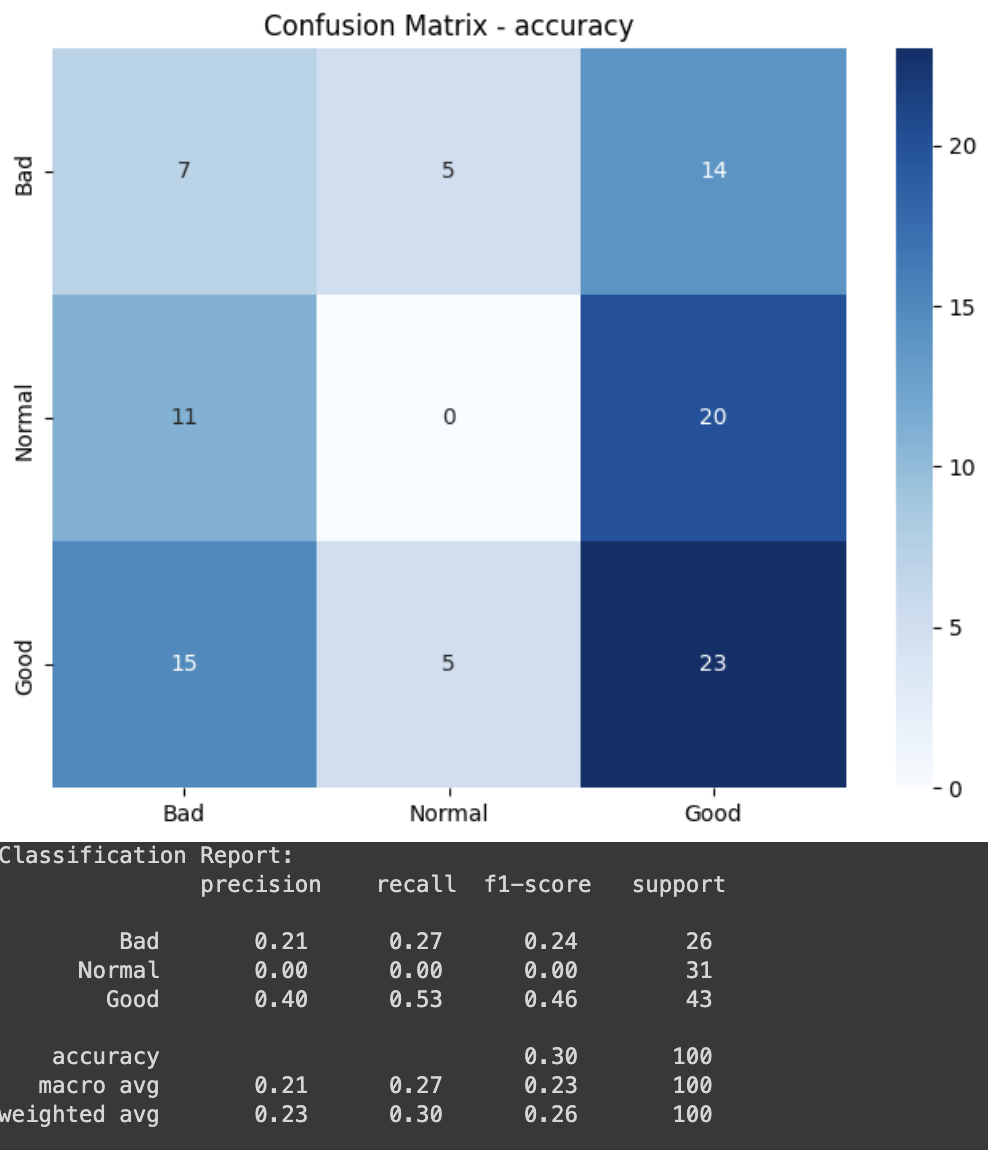
# initialize target_names, y_test, y_pred
target_names = ['Bad', 'Normal', 'Good']
y_test = answer_df['accuracy']
y_pred = predict_df['accuracy']

# Generate confusion matrix
conf_matrix = confusion_matrix(y_test, y_pred)

# Visualize confusion matrix
plt.figure(figsize=(8, 6))
sns.heatmap(conf_matrix, annot=True, fmt="d", cmap="Blues", xticklabels=target_names, yticklabels=target_names)
plt.title("Confusion Matrix - accuracy")
plt.show()

# Print classification report
class_report = classification_report(y_test, y_pred, target_names=target_names)
print("Classification Report:\n", class_report)
And we also evaluate remaining models.
# initialize y_test, y_pred
y_test = answer_df['completeness']
y_pred = predict_df['completeness']

# Generate confusion matrix
conf_matrix = confusion_matrix(y_test, y_pred)

# Visualize confusion matrix
plt.figure(figsize=(8, 6))
sns.heatmap(conf_matrix, annot=True, fmt="d", cmap="Blues", xticklabels=target_names, yticklabels=target_names)
plt.title("Confusion Matrix - completeness")
plt.show()

# Print classification report
class_report = classification_report(y_test, y_pred, target_names=target_names)
print("Classification Report:\n", class_report)
# initialize y_test, y_pred
y_test = answer_df['fluency']
y_pred = predict_df['fluency']
# Generate confusion matrix
conf_matrix = confusion_matrix(y_test, y_pred)
# Visualize confusion matrix
plt.figure(figsize=(8, 6))
sns.heatmap(conf_matrix, annot=True, fmt="d", cmap="Blues", xticklabels=target_names, yticklabels=target_names)
plt.title("Confusion Matrix - fluency")
plt.show()
# Print classification report
class_report = classification_report(y_test, y_pred, target_names=target_names)
print("Classification Report:\n", class_report)# initialize y_test, y_pred
y_test = answer_df['prosodic']
y_pred = predict_df['prosodic']
# Generate confusion matrix
conf_matrix = confusion_matrix(y_test, y_pred)
# Visualize confusion matrix
plt.figure(figsize=(8, 6))
sns.heatmap(conf_matrix, annot=True, fmt="d", cmap="Blues", xticklabels=target_names, yticklabels=target_names)
plt.title("Confusion Matrix - prosodic")
plt.show()
# Print classification report
class_report = classification_report(y_test, y_pred, target_names=target_names)
print("Classification Report:\n", class_report)9) Application Guide for Parents
1. Summary of previous processes
:focusing on the technical aspects
We focused on the social issues first, as we have discussed earlier. In order to be more helpful in children's pronunciation education, we conceived and developed the 'Tell your words' service.
In order to proceed with meaningful learning, rather than simply repeating their pronunciation, they went through a process of selecting sentences that were difficult for children to pronounce through analysis of child data sets. Since then, we have established a scoring system using existing data to score and show where children are vulnerable, and in the process, we have also conducted few-shot learning to compensate for the lack of data.
These processes allow the child to communicate with the NUGU, analyze the recorded speech voice, and quantify it into data. After that, only the process of visualizing it as a graph based on the score and sending it to parents so that they can check it with the app remains.
In this chapter, we will attach a simple app image to describe what functions the app provides and what convenience the user has.
2. App Screen and Feature Description
Introducing a simple screen configuration
The screen that configures the app consists of six types: login, home, study list, AI report, challenge and profile. At the bottom, we will introduce the detailed functions of each screen along with the picture.
Login screen

The first thing to introduce is the login screen. Since NUGU is SK's unique service, it provides a simple login 'T ID' service for T members to log in. In addition, we provide logins through self-authentication.
Home screen
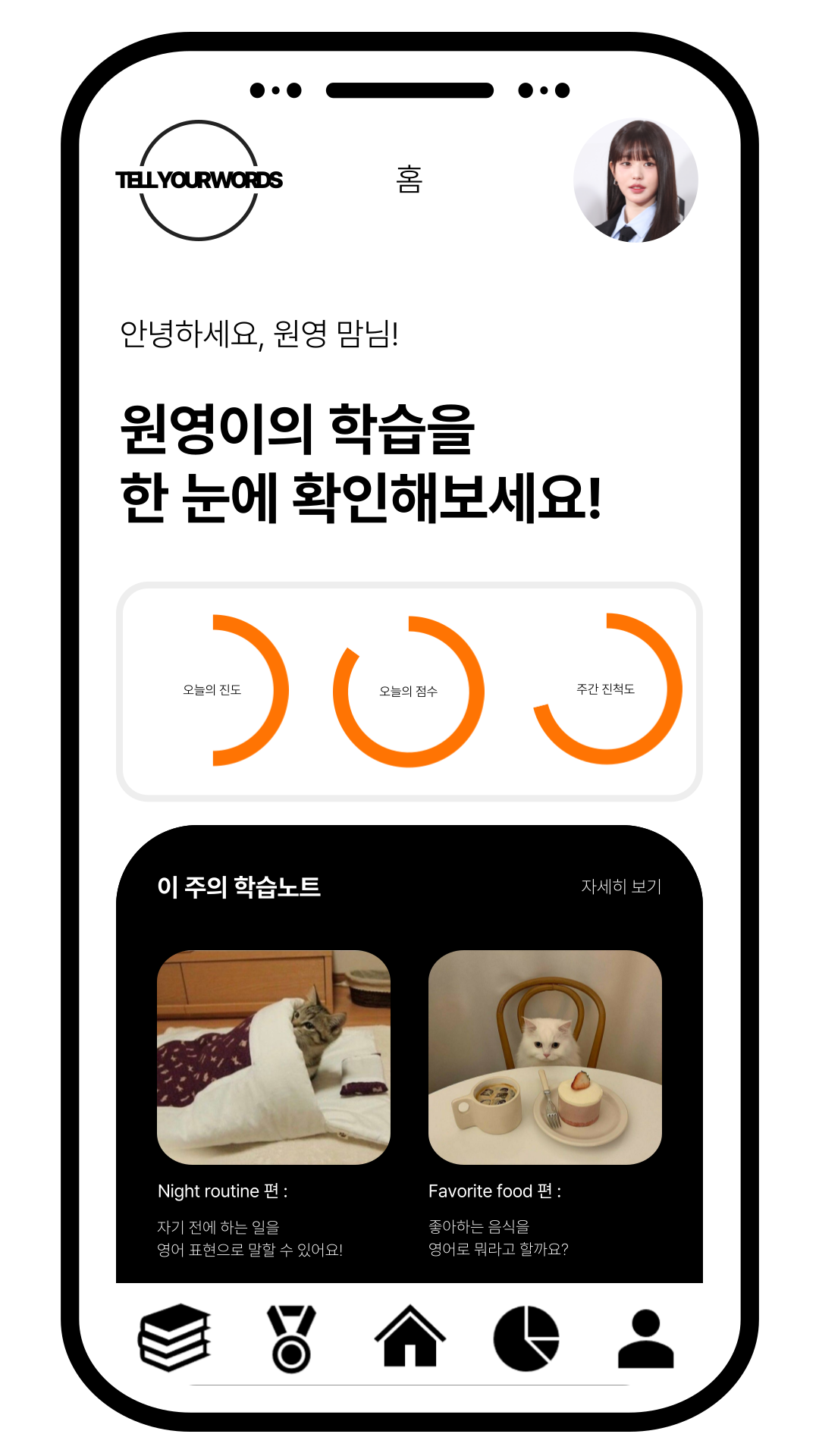
Next, the main screen. This is the first screen that parents encounter when they access the app and log in. By showing today's progress, today's score, and weekly progress in graphs, parents can see their child's learning status immediately. Below that, they provide an image with a brief description of what they were learning this week. Parents can see what their child has been studying, and if they want to know more about it, they can touch it and move on to the study list screen.
Study list screen
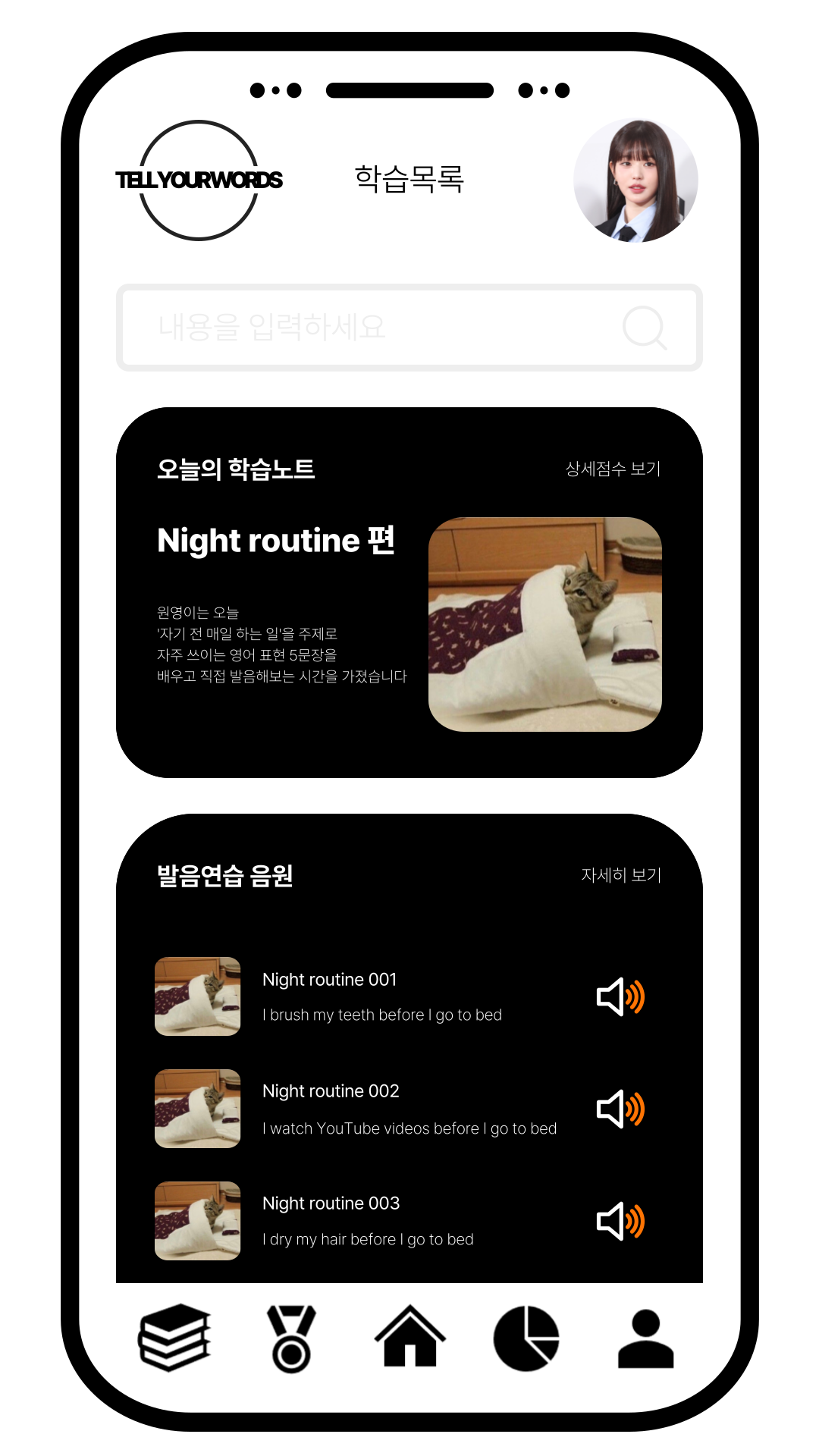
Parents who want to know more about learning will move on to the study list screen. It provides a search service based on a study date or keyword and provides a detailed description of today's learning. The tab at the bottom helps parents review their weaknesses with their children by providing the right pronunciation sound source. So how do I know what part of today's learning the child was weak? Touch today's study note and move on to the AI report screen.
AI report screen
This is the AI report screen. As in the process described above, the child's pronunciation is quantified and scored, and then visualized directly to make it easier for parents to understand. The report consists of three main parts: speech scores by four indicators, level analysis compared to the same age group, and total monthly increase.

First, it is a graph of speech scores by four indicators. By providing it in a radial graph, it compares multiple variables at the same time and allows you to see immediately what is vulnerable. Below is a brief comment to guide you on how much your child is currently and what indicators are particularly weak.
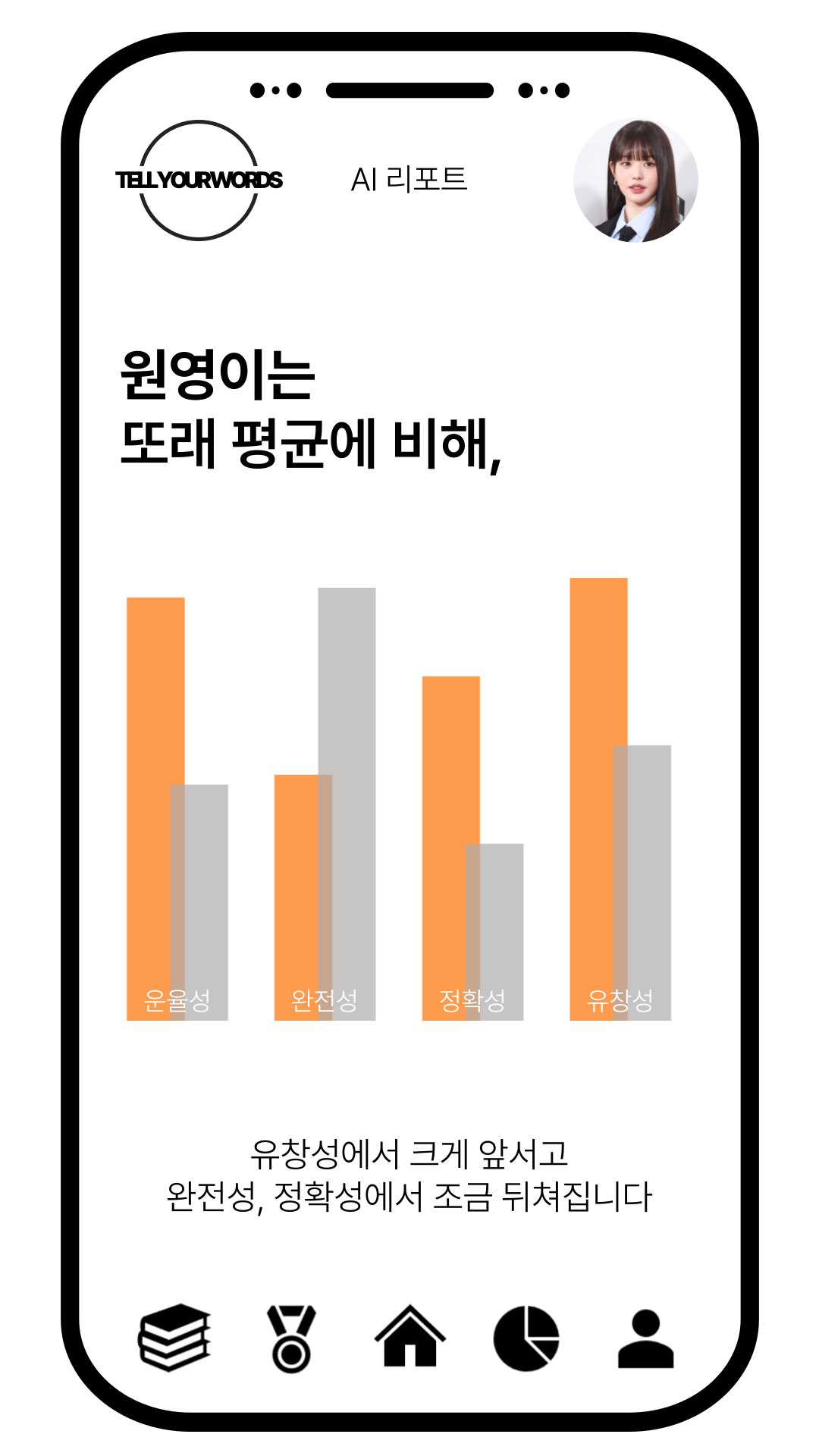
Next is a graph of level analysis compared to the same age group. You can see not only the figures for the four indicators, but also the rate of development of the child by showing what level they are located for their age. Similarly, comments describe the indicators below that are strong and those that are weak.
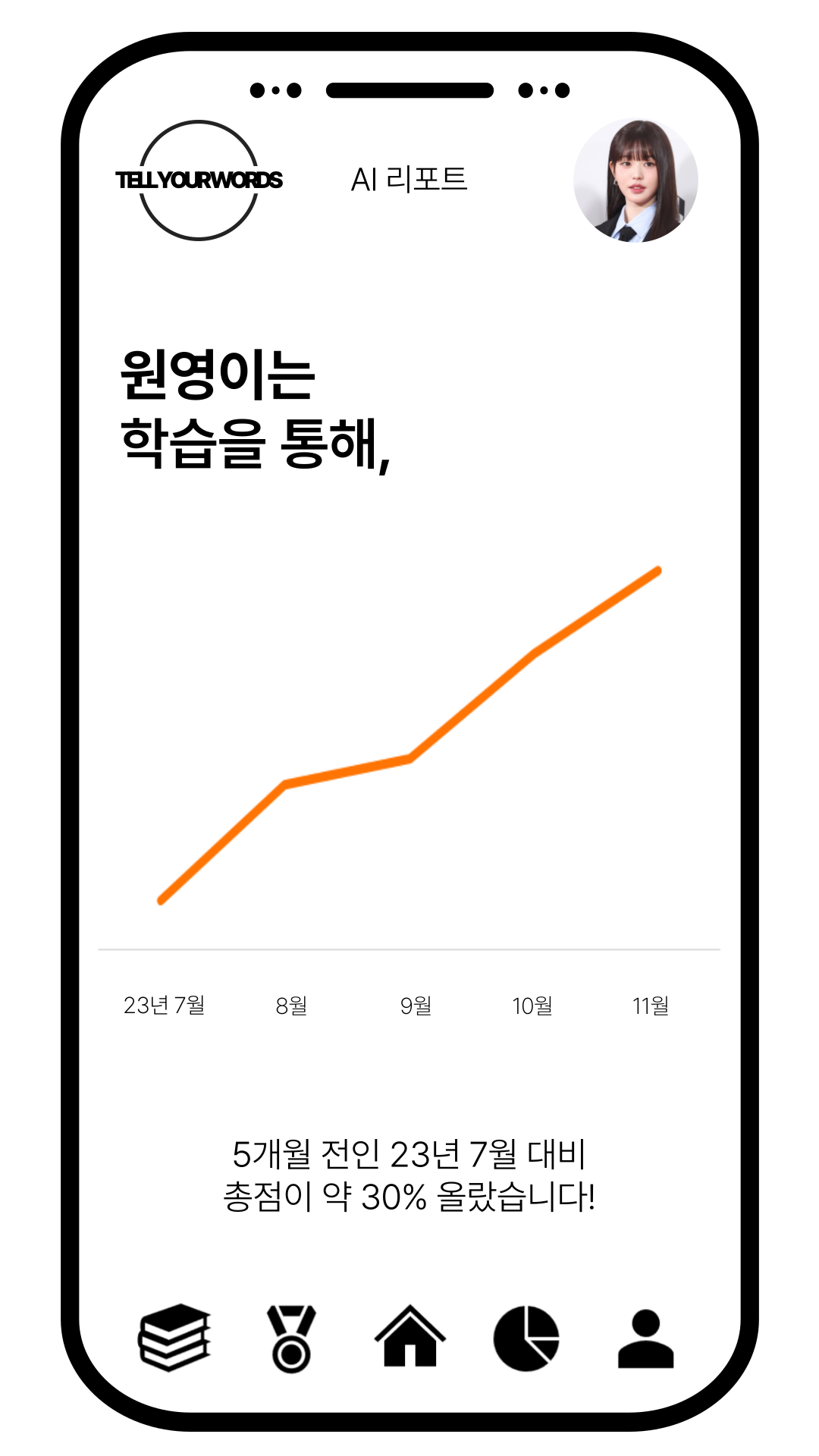
Finally, it's a graph of the growth rate over time. Parents can check whether this learning was meaningful under the assumption that their children have learned by using the Tell Your Words service steadily. The monthly total score is shown in a linear graph so that you can see the continuous rise directly with your eyes. In addition, by providing the increase rate in numbers in the comments below, we enhance the meaning of the service and encourage continuous participation.
Learning lists and AI reports have proved that learning is meaningful and helped us learn. But learning can still be boring for a child. Can't you make this daily service more interesting and want to do it first? The answer is simple. It's about offering a reward.
Challenge screen

The challenge screen provides rewards for learning. As the goal is to provide free of charge from NUGU, it is difficult to provide a big financial reward, but wouldn't that be enough motivating if you provide rewards that you want to steadily collect, such as T membership points?
The challenge is largely composed of two parts. First, it's a mission to achieve the task. It's a method of receiving points written on the right by performing simple missions. After that, it's a long-term mission. For example, you can pay points when you attend for one, two, or three months in a row, or you can pay points when you're together, that is, when you're 100 days, 200 days, 300 days after you start the service. Or you can pay it in celebration, like when you're in the top few percent or when you're reducing your vulnerabilities.
By praising the passion as a reward, watching it, and giving the feeling of sharing the child's growth, parents and children can participate, and additionally, the use of T membership points can be increased.
Profile screen
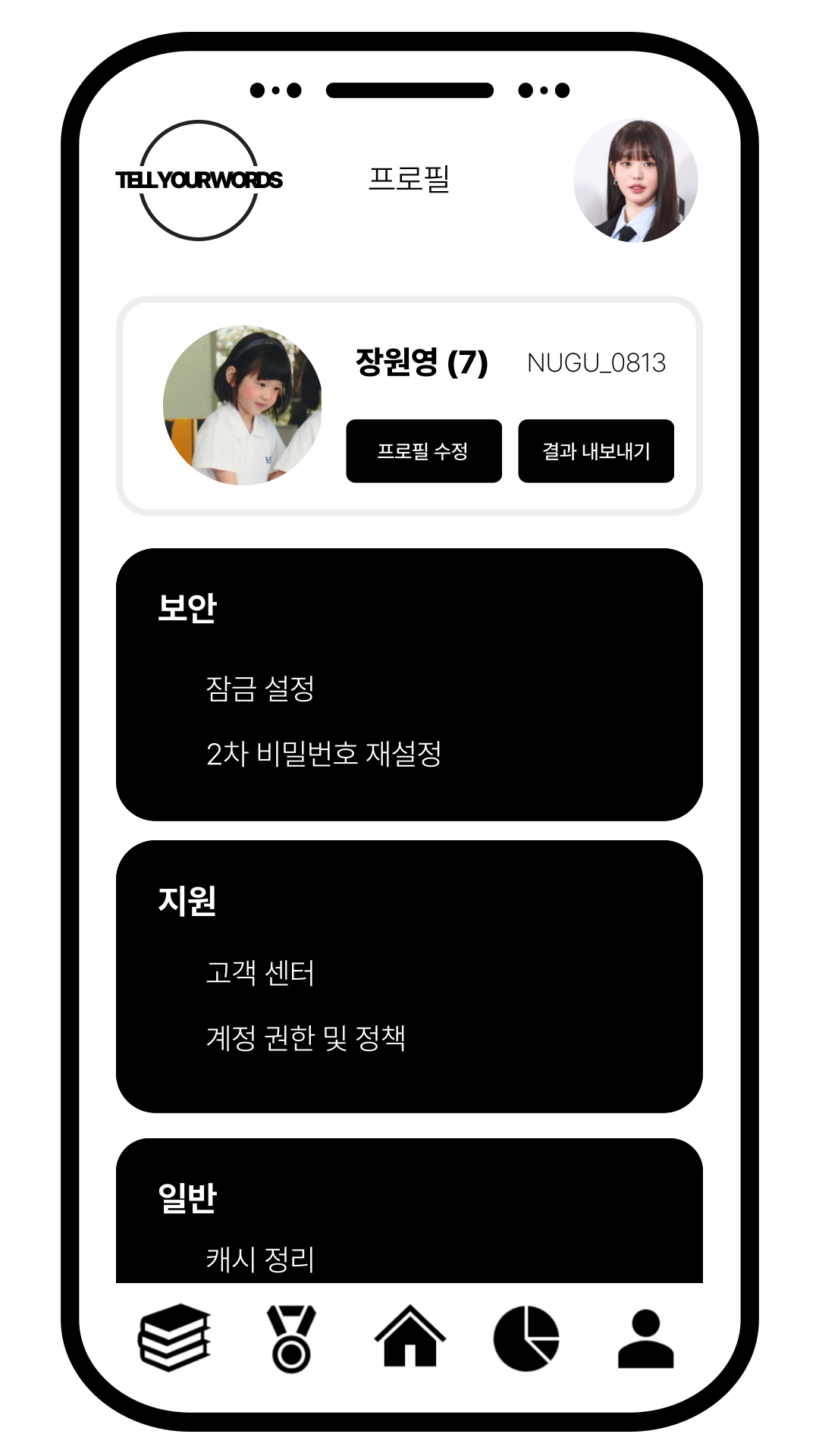
Finally, the profile screen. It is for NUGU interworking and registration of parent and child profiles and provides additional export of results. This allows customers to promote their own Tell your words service. If you look at the recent SNS, parents like to post pictures of their children's lives in general. Especially when it comes to your child's current development and what they're good at. We would like to take advantage of that and promote it. Click the Export Results button to help you save today's AI report as an image or share it on social media. Based on this, it makes other parents want to use the Tell your words service, promotes the use of NUGUs, and creates an influx of customers for free. In addition, it provides customer centers and secondary locking to listen to customers.
10) Conclusion and related works
Conclusion
Through the 'tell your words: Speaking practice service for children', We could achieve the following below. And at the same time, we will explain the limitations of the proposed service as follows.
Expected achievement
- Supporting children to improve their pronunciation skills
- Offering more active English education materials to the users
- Analyzing and making future work about children’ language development
Limitation
- Need more labelled data for accuracy
- Need professional annotators to determine pronunciation scores
- Need to check if NUGU speaker can save speakers’ .wav data’
Therefore, if we improve in the data collection and labeling process to collect better pronunciation score labeling data for model learning and services, we will be able to get reasonable accuracy and gain trust in the results from service users.
Related works
Select sentences that are difficult to pronounce based on the data
- Templin, M. C., (1957), Certain Language Skills in Children: Their Development and Interrelationships. Institute of Child Welfare Monographs, Vol. 26, Minneapolis: University of Minnesota Press.
- 엄정희(1987), “3, 4, 5세 아동의 말소리 발달에 관한 연구: 자음을 중심으로”, 이화여자 대학교 대학원 석사학위 논문.
- 이기정(1997). "새국어생활", 국립국어원 Vol.1 No.7.
Data Description
- Weinberger, Steven., (2015), Speech Accent Archive. George Mason University. Retrieved from http://accent.gmu.edu
Audio augmentation
- Kharitonov et al., (2020), Data Augmenting Contrastive Learning of Speech Representations in the Time Domain. Retrieved from https://paperswithcode.com/paper/data-augmenting-contrastive-learning-of
Pronunciation scoring via similarity
- Baevski et al., (2020), wav2vec 2.0: A Framework for Self-Supervised Learning of Speech Representations. Retrieved from https://paperswithcode.com/paper/wav2vec-2-0-a-framework-for-self-supervised
Pronunciation scoring via fine-tuned model
- Hugging Face audio classification guidance, Retrieved from https://huggingface.co/docs/transformers/tasks/audio_classification