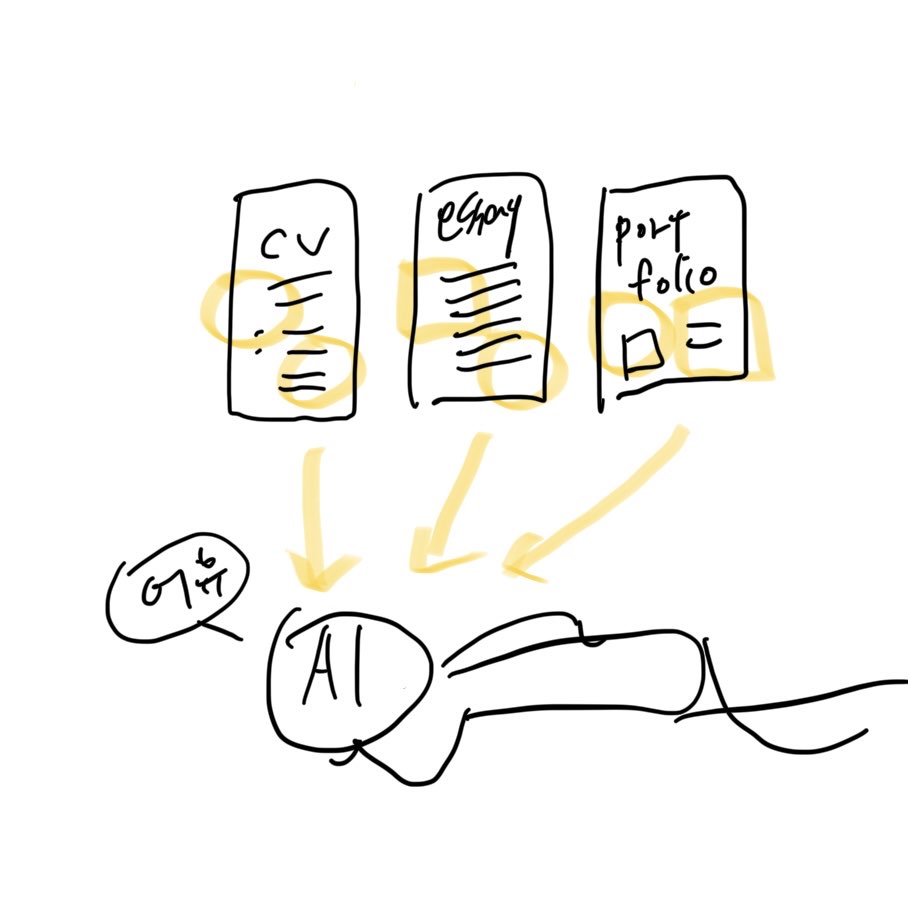
이 글의 주요 목표
- 유형별 문서를 의미 단위로 파싱
- RAG 챗봇 프로젝트에 사용 가능하도록 정제
이 글에 담긴 내용
- 기본적인 데이터 수동 전처리
- Langchain을 이용한 문서 청킹과 정제
- docx, pdf 타입 에세이, resume 등 타입에 따른 청킹과 정제
- 임베딩을 위한 메타데이터 설계
어떻게 문서를 파싱할까?
Langchain을 활용한 문서 Loading, Text Splitting
docx 타입 문서의 경우 Python 라이브러리 중 python-docx, docling 여러가지 parser를 통해 처리할 수 있다.
이 프로젝트는 RAG 용 데이터를 구축하는 게 목적이고, 복잡한 제약조건이 없기 때문에 langchain을 사용해 간단하게 파싱 후 정제하기로 해 본다. langchain은 RAG 파이프라인 흐름을 표준화 해 두었기 때문에 편하다. (Loader, textsplitter, embedding, vectordb, llm 흐름으로). 메타데이터 관리도 편해서 나중에 의미기반 retrieval에 효율이 좋다. 이외에도 Haystack, LlamaIndex 등의 기능을 사용하면 상황에 맞는 청킹을 할 수 있다.
from langchain_community.document_loaders import Docx2txtLoader

loader = Docx2txtLoader("documents/sample_CV.docx")
docs = loader.load()
from langchain_text_splitters import RecursiveCharacterTextSplitter
splitter = RecursiveCharacterTextSplitter(
chunk_size=400,
chunk_overlap=100,
)
chunks = splitter.split_documents(docs)langchain라이브러리 Docx2txtloader와 TextSplitter로 문서를 불러오고 기본적인 전처리(불필요한 공백제거, 페이지 번호 제거 등)을 해 준다. 위 예시는 500자 기준, 앞 청크와 100자까지 중복가능하게 splitting 한다. '자'가 아닌 토큰 단위 스플릿이 필요할 경우 TokenTextSplitter를 사용할 수 있다. 여기서는 실험용으로 글자수를 기반으로 눈에 보이는 결과를 확인해 보았다.
print(chunks[0])

'''
page_content='NAME
Email : ABC@gmail.com
www.linkedin.com/ABC
“Contextual” problem-solver. Discovering hidden contexts to solve challenging problems,
transforming stories into explainable data, and creating reliable solutions.
ㅡ
Experience
AI Engineer, Remote, 12.2030 ~06.2100
@ AI company - ABC LTD
Fine-tuned LLMs, blahblahblah. metadata={'section': 'unknown', 'source': 'documents/sample_CV.docx'}
'''
샘플 이력서를 넣고 결과를 확인해보니 이력서의 경우 문장이 짧고 정보의 밀도가 높아서 의미단위로 제대로 나눠지지 않는다.
단지 길이제한 (400), 연속성 보존(100) 정도의 역할을 수행하며, 의미나 구조를 반영하지 않는다.
Section titles 을 리스트로 저장 후 룰 기반 청킹
의미와 구조를 반영하기 위해 가장 간단한 방법으로 섹션을 수동으로 (...) 분리하고 섹션에 따라 하나의 의미단위로 청킹해 보겠다.
SECTION_TITLES = {
    "award", "skill", "experience",
    "projects", "education", "certifications",
    "award & completion"
}

def detect_section(line: str):
    normalized = line.lower().strip()
    normalized = normalized.replace(".", "").replace(":", "").replace("ㅡ", "").strip()

    for section_title in SECTION_TITLES:
        if normalized == section_title or (normalized.startswith(section_title) and \
                                          (len(normalized) == len(section_title) or not normalized[len(section_title)].isalnum())):
            return section_title
    return None
def split_records(lines):
records = []
buffer = []
for line in lines:
line = line.strip()
if not line:
continue
if line.startswith("-") and buffer:
records.append("\n".join(buffer))
buffer = [line]
else:
buffer.append(line)
if buffer:
records.append("\n".join(buffer))
return records
def split_by_length(text, max_len=400):
sentences = re.split(r"(?<=[.!?])\s+", text)
chunks = []
buffer = ""
for s in sentences:
if len(buffer) + len(s) <= max_len:
buffer += (" " if buffer else "") + s
else:
chunks.append(buffer)
buffer = s
if buffer:
chunks.append(buffer)
return chunks
def enforce_length_limit(records, max_len=400):
final = []
for r in records:
if len(r) <= max_len:
final.append(r)
else:
final.extend(split_by_length(r, max_len))
return finalfrom langchain_core.documents import Document
def build_resume_chunks(docs):
chunks = []
current_section = "unknown"
section_lines = []
for d in docs:
lines = d.page_content.split("\n")
for line in lines:
section = detect_section(line)
if section:
if section_lines:
records = split_records(section_lines)
for r in records:
chunks.append(
Document(
r, # Changed from page_content=r
metadata={
"section": current_section,
"source": d.metadata.get("source", "unknown")
}
)
)
current_section = section
section_lines = []
else:
section_lines.append(line)
if section_lines:
records = split_records(section_lines)
records = enforce_length_limit(records, max_len=400)
for r in records:
chunks.append(
Document(
r, # Changed from page_content=r
metadata={
"section": current_section,
"source": d.metadata.get("source", "unknown")
}
)
)
return chunks간결한 이력서에는 통상적으로 들어가는 헤더들이 있으므로, 수동으로 넣어준다.
- 대문자나 ':' 등이 섹션 헤더에 쓰여도 헤더로 잘 인식되게 한다.
- 섹션 헤더가 아닌데도 문장에서 해당 단어가 쓰일 경우를 헤더로 잘못 인식하지 않도록 한다.
- 불렛포인트가 나올 경우 이전 내용을 하나의 레코드로 인정한다.
- 길이 제한
- 리스트[]형태로 청크를 저장한다.
- 메타데이터(임시) 를 저장한다.
그러나 현재 상황의 문제는 수동으로 섹션을 지정했기 때문에 다른 문서에서 재사용하기가 어렵고, 정형화된 resume만을 위한 splitting이 되어버렸으며, 섹션명 자체가 정확히 의미단위라고 확신할 수 없다.
메타데이터 설계, 문서 유형별 전략 설정?
지금은 메타데이터가 'section'과 'source' 밖에 없다. 지정한 섹션이름을 만나면 반환하는 형식이기 때문에 지나치게 규칙기반이다.
{
  "person_id": "user_001",
  "source_type": "resume",
  "logical_type": "project",
  "confidence": 0.92,
  "time_range": "2023-03 ~ 2023-08",
  "skill_tags": ["Unity", "C#", "AI"],
  "source": "resume_v1.pdf"
}
위 같은 형식으로 문서를 의미단위로 나눌 수 있도록 스키마를 확장할 필요가 있다.
또한, 도메인과 상황, 문서구조에 따라 최적값이 달라지므로 메타데이터 스키마를 고정해 두면 이후 유지보수, 재인덱싱 비용을 절감할 수 있다.
from langchain_core.documents import Document

def build_resume_chunks(docs, person_id="unknown_user"):
    chunks = []

    current_section = "unknown"
    current_logical_type = "unknown"
    section_lines = []

    for d in docs:
        lines = d.page_content.split("\n")

        for line in lines:
            section = detect_section(line)

            if section:
                if section_lines:
                    records = split_records(section_lines)
                    records = enforce_length_limit(records, max_len=400)

                    for r in records:
                        meta = {
                            "person_id": person_id,
                            "source_type": "resume",
                            "logical_type": current_logical_type,
                            "section_hint": current_section,
                            "time_range": extract_time_range(r),
                            "skill_tags": extract_skill_tags(r),
                            "confidence": estimate_confidence(r, current_logical_type),
                            "source": d.metadata.get("source", "unknown")
                        }
                        chunks.append(
                            Document(
                                r, # Changed from page_content=r
                                metadata=meta
                            )
                        )

                current_section = section
                current_logical_type = SECTION_TO_LOGICAL_TYPE.get(section, "unknown")

                section_lines = []
            else:
                section_lines.append(line)

    if section_lines:
        records = split_records(section_lines)
        records = enforce_length_limit(records, max_len=400)

        for r in records:
            meta = {
                "person_id": person_id,
                "source_type": "resume",
                "logical_type": current_logical_type,
                "section_hint": current_section,
                "time_range": extract_time_range(r),
                "skill_tags": extract_skill_tags(r),
                "confidence": estimate_confidence(r, current_logical_type),
                "source": d.metadata.get("source", "unknown")
            }
            chunks.append(
                Document(
                    r, # Changed from page_content=r
                    metadata=meta
                )
            )

    return chunks
'''
page_content='NAME
Email : ABC@gmail.com
www.linkedin.com/ABC
“Contextual” problem-solver. Discovering hidden contexts to solve challenging problems,
transforming stories into explainable data, and creating reliable solutions.
ㅡ' metadata={'person_id': 'unknown_user', 'source_type': 'resume', 'logical_type': 'unknown', 'section_hint': 'unknown', 'time_range': None, 'skill_tags': ['AI'], 'confidence': 0.7, 'source': 'documents/sample_CV.docx'}
'''메타데이터를 추가하고 품질이 향상됐다.
def split_essay_paragraphs(text):
    return [p.strip() for p in re.split(r"\n\s*\n", text) if p.strip()]

def split_sentences(text):
    return re.split(r"(?<=[.!?])\s+", text)
def build_essay_chunks(docs, person_id="unknown_user", max_len=400):
chunks = []
for d in docs:
text = d.page_content.strip()
paragraphs = split_essay_paragraphs(text)
for p in paragraphs:
if len(p) <= max_len:
records = [p]
else:
sentences = split_sentences(p)
records = []
buffer = ""
for s in sentences:
if len(buffer) + len(s) <= max_len:
buffer += (" " if buffer else "") + s
else:
if buffer:
records.append(buffer)
buffer = s
if buffer:
records.append(buffer)
for r in records:
meta = {
"person_id": person_id,
"source_type": "essay",
"logical_type": "self_introduction",
"section_hint": None,
"time_range": extract_time_range(r),
"skill_tags": extract_skill_tags(r),
"confidence": estimate_confidence(r, "self_introduction"),
"source": d.metadata.get("source", "unknown")
}
chunks.append(Document(r, metadata=meta))
return chunks불렛포인트의 resume형식이 아닌 자기소개서형 줄글의 경우 청킹 전략을 다르게 한다.
이 때 이력서인지, 자기소개서인지 분류하는 별도의 함수가 필요하다.
즉 classify_document(청킹전략 선택) -> 구조기반(resume) or 문맥보존(essay).
다음 글에서는 벡터 데이터베이스 유형, 검색 유형 및 방법을 결정해보겠다.
이 글이 참고한 문서
- Nebius Academy LLM Essentials Notebooks
https://github.com/Nebius-Academy/LLM-Engineering-Essentials/tree/main
- 위키독스 테디노트, 랭체인LangChain 노트
https://wikidocs.net/book/14314
- 요즘 IT, RAG 애플리케이션 개발을 위한 청킹 최적화
https://yozm.wishket.com/magazine/detail/3432
- KT Cloud,RAG 시스템의 성능을 좌우하는 청킹(Chunking) 전략과 최적화 방법
https://tech.ktcloud.com/entry/2025-11-ktcloud-rag-ai-청킹전략-최적화
'In progress' 카테고리의 다른 글
| [RAG 자기소개봇] 4. 허깅페이스 뜯어보기, 성능 평가 지표 (1) | 2026.02.01 |
|---|---|
| [RAG 자기소개봇] 3. 검색과 응답 품질을 높이는 방법 (1) | 2026.01.28 |
| [RAG 자기소개봇] 2. 벡터 데이터베이스에 저장하고 검색 (2) | 2026.01.23 |